
How to check if a used Android phone is in good condition
A phone that's been used for a year or two can look perfectly fine and still have real problems underneath. Batteries degrade invisibly. Storage chips slow down. Sensors drift. The screen might respond everywhere except a small patch in one corner that nobody notices until they try to type the letter P on the keyboard.
Assessing actual condition takes about fifteen minutes and doesn’t require installing anything.
Start with the things you can’t see
Battery health matters more than anything else in a used phone, because a degraded battery affects everything: screen-on time, performance (Android throttles the CPU when the battery can’t deliver stable voltage), and reliability under load.
Samsung phones show battery status through the Samsung Members app under Support > Phone diagnostics > Battery. Google Pixel 8a and newer models show battery health under Settings > Battery > Battery Health, and cycle count under Settings > About phone > Battery information. Many recent OnePlus, OPPO, and Realme devices show battery health somewhere under Settings > Battery, but availability varies by model, region, and OS version. Xiaomi and POCO phones may put it under Settings > Battery (look for Battery Protection or Battery Information depending on the HyperOS version).
For phones that don’t expose a health reading natively, dial *#*#4636#*#* in the Phone app. On supported devices, this opens a testing menu with battery voltage, temperature, and status. The code doesn’t work on every phone, particularly newer Samsung and some Xiaomi models.
Anything above 90% health is solid. Between 80% and 90% means the battery has seen real use but still has life left. Below 80%, expect to replace the battery in the near term. A third-party battery replacement is often around $50-150 or local equivalent, but sealed flagships, foldables, and official service can cost more.
Storage condition is harder to quantify but worth checking. Open Settings > Storage and note how full the phone is. More telling than the raw number: does the phone hesitate when launching apps? Does the camera take a second before saving photos? NAND flash memory slows down as it fills and as cells wear from repeated writes, and these symptoms show up as general sluggishness that gets mistaken for a slow processor.
The physical stuff
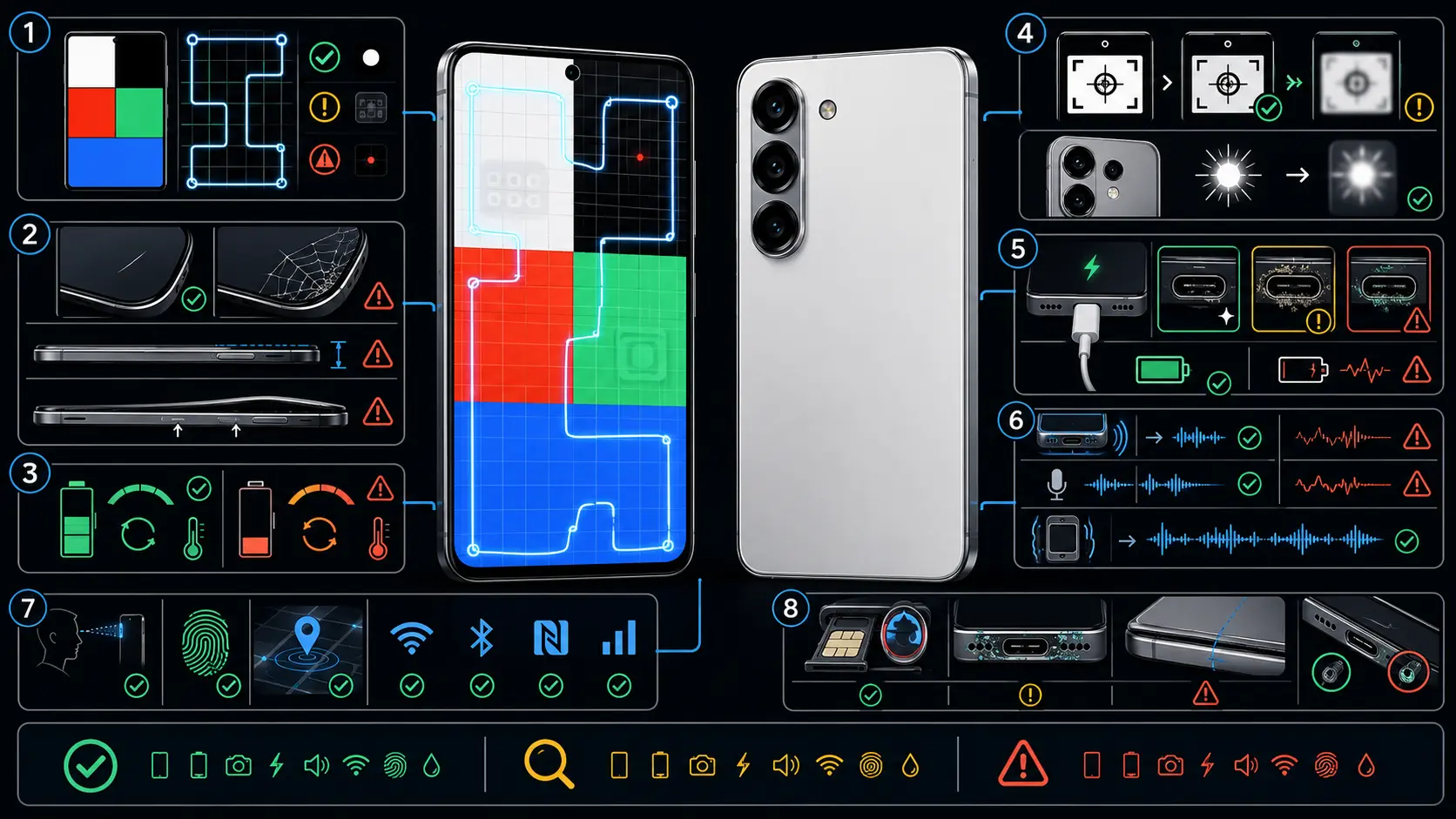
Hold the phone under bright lighting and look at the screen from several angles. Small scratches invisible head-on become obvious at an angle. Check the edges where cracks from drops tend to start. Set the phone flat on a table. If it rocks or wobbles, either the frame is bent or the battery has started swelling. A swollen battery is a safety issue, not just a performance one.
The charging port collects lint from pockets over months of use. Look inside with a flashlight. Compacted debris causes intermittent charging, which often gets misdiagnosed as a battery problem. A wooden toothpick clears it out without damaging the contacts.
Buttons should click cleanly. A mushy power button or a volume rocker that needs to be pressed twice is wear that won’t get better on its own.
Screen and touch
Dead pixels show up as tiny dark spots on a white background. Open a browser, search for “white screen test,” go full-screen, and look carefully. Repeat with pure red, green, blue, and black to catch subpixel issues. OLED screens can also develop burn-in from elements displayed in the same position for months: the navigation bar, the status bar, a frequently used app’s interface. A medium-gray full-screen image makes burn-in visible if it’s there.
Touch dead zones are trickier to spot. Enable Developer Options by tapping Build Number seven times under Settings > About Phone, then activate Show Pointer Location. Swipe a finger slowly across the entire display surface. The coordinate trail should follow without gaps, especially in the corners and along the edges where ribbon cable connections are most vulnerable to impact damage.
Sensors, speakers, cameras
Most sensor problems reveal themselves through everyday functions. Rotate the phone sideways and the screen should follow smoothly (accelerometer and gyroscope). Make a call and hold a hand over the earpiece area; the screen should turn off (proximity sensor). Walk from a bright room into a dark one with auto-brightness enabled; the display should dim within a few seconds (ambient light sensor). Open Google Maps and tap the location arrow; the blue direction beam should point roughly the right way (magnetometer).
Samsung phones have a dedicated hardware test accessible by dialing *#0*#, covering sensors, display, touch, speakers, cameras, and vibration in individual test screens. For other brands, the manual checks above cover the same ground.
Play music through the speaker at different volumes. Crackling or distortion at moderate levels suggests speaker damage. Record a short voice clip and play it back for the microphone. Open both front and rear cameras and take a few photos in decent light. Look for focus problems, blurry patches, or a camera that hunts back and forth without locking.
Water damage
Many Android phones have a liquid contact indicator (LCI) visible inside the SIM card tray slot. Remove the tray and look in with a light. White or silver means no water contact. Pink or red means liquid has entered the phone at some point. A pink indicator doesn’t mean the phone is broken right now, but water damage tends to worsen as internal corrosion spreads. Worth knowing about, not an automatic disqualifier.
Software state
Check the Android version and security patch date under Settings > About Phone. A phone several patches behind may have just been neglected, which is fixable with an update. A phone that can’t update to the latest available version for its model might have a firmware issue.
Remaining software support determines how long the phone stays secure and compatible with current apps. The Google Pixel 8 family and newer and the Samsung Galaxy S24 family and newer get seven years of updates. Samsung’s mid-range A56, A36, and A26 get six years. OnePlus 13 gets four major Android upgrades and six years of security patches. Older and budget phones from many brands still top out at two to three years, though phones newly placed on the EU market from June 2025 have a stronger software-support floor under EU ecodesign rules. A phone with less than a year of support left is approaching end-of-life for anything security-sensitive.
For a consolidated view of where a phone stands across battery, thermal, storage, and network health, runcheck produces a single health score from an on-device scan. Useful when assessing condition without memorizing which Settings path each manufacturer uses.
The things that matter most are the least visible: battery health, storage speed, remaining software support. The scratches and cosmetic dings are negotiable. What’s inside determines whether the phone has one year of life left or three.
Sources
Turn symptoms into a clearer picture of your phone's health.
runcheck connects battery, heat, signal, and storage patterns so you can see what is really dragging a phone down.