
What to Check Before Buying a Used Android Phone
A used phone that was $900 new last year can often be found for $400-500 in good condition. The savings are real, but so is the risk of paying for a phone that is carrier-locked, blacklisted, still tied to someone else's account, or already close to the end of security support.
The checks below are ordered by severity. The first three are deal-breakers. Everything after that determines what the phone is actually worth.
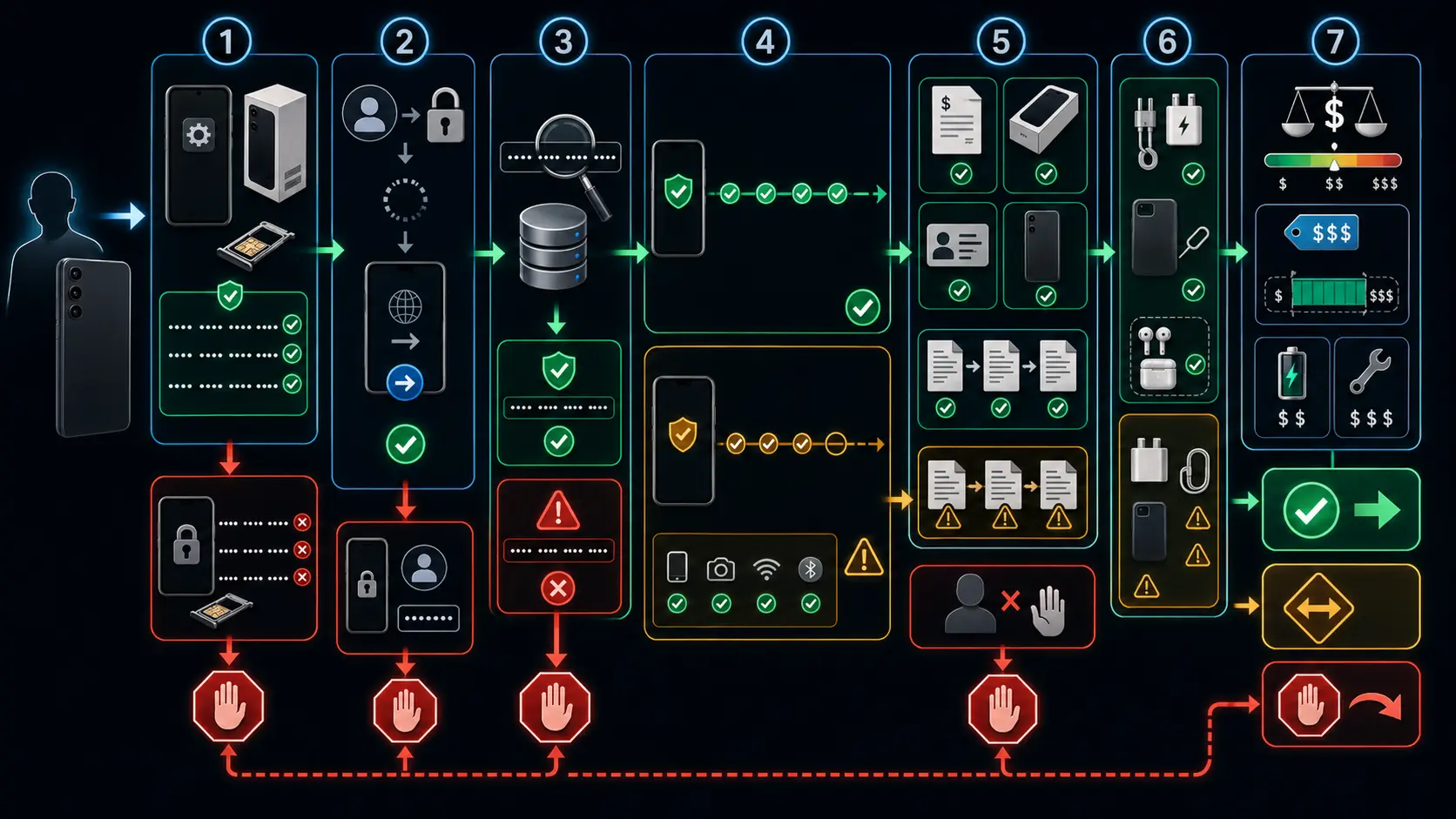
Deal-Breakers: Walk Away If These Fail
Three things can make a used Android phone worthless regardless of how good it looks.
The IMEI is the phone’s network identity number. Dial *#06# to display it, then check that same number in more than one place: a stolen or blacklist database such as the CTIA Stolen Phone Checker in the US, Swappa’s IMEI checker, or the carrier’s own IMEI and compatibility tool. A clean result means the phone is not currently reported as lost, stolen, or blocked in that database. It does not prove the phone is fully paid off, and it does not guarantee it will never be blocked later if a financing issue appears. Ask the seller for proof that the device is paid off, especially if it was bought through a carrier.
A blacklisted phone can fail activation or lose network access. A phone still tied to unpaid financing can become a problem later if the original buyer defaults. Either scenario turns a good-looking phone into an expensive Wi-Fi-only device.
Factory Reset Protection is Android’s anti-theft lock. If the previous owner did not remove their Google account before resetting the phone, FRP activates during setup and demands the original account credentials. There is no legitimate bypass a buyer should rely on. Ask the seller to show that the phone can get through setup without asking for a previous owner’s Google account. If it stops at a verification screen for an account that is not yours and not available, walk away.
Carrier lock restricts which networks the phone can use. Insert a SIM from a different carrier than the phone was originally sold on, or use your carrier’s IMEI checker if the phone is eSIM-only. If it registers on the network and makes a call or connects to mobile data, that is a good sign. “SIM not supported,” “network locked,” or failure to register usually means the phone is locked. A carrier-locked phone can sometimes be unlocked, but it depends on the original carrier’s rules, payment status, and account holder cooperation. Do not pay unlocked-phone prices for a locked phone.
Battery: The Biggest Variable in Price
Battery health determines more about daily use than almost anything else. It affects screen-on time, heat, charging habits, and in some cases performance under load. It is also the single best negotiating lever when buying used.
| Health range | What it means | Price impact |
|---|---|---|
| 90-100% | Excellent, minimal wear | Full asking price can be justified |
| 85-89% | Normal use, plenty of life left | Fair price, no major adjustment needed |
| 80-84% | Noticeable wear, replacement may be needed during ownership | Deduct the realistic local battery replacement cost |
| Below 80% | Replacement likely needed soon | Deduct replacement cost, or reconsider |
The actual replacement cost varies more than sellers usually admit. A simple battery swap on an older Android phone can be inexpensive. A newer sealed flagship, official service repair, or foldable can cost much more. As a practical buying rule, expect roughly $50-200 depending on model, country, part quality, and whether the repair is independent or authorized. If you can get a local quote before buying, use that number instead of a generic estimate.
Where to find the reading:
Samsung: Open the Samsung Members app, tap Support, then Phone diagnostics. Battery status is included in the diagnostic checks. Some newer Galaxy models and regions show more detailed battery information, but many still show only a condition label rather than an exact percentage.
Google Pixel: Pixel 8a and later show battery health under Settings > Battery > Battery health. Pixel 8a and later also show cycle count under Settings > About phone > Battery information. Pixel 8 and Pixel 8 Pro have the long software support window, but they do not have the same Battery Health page.
OnePlus, OPPO, and Realme: Many recent models show battery health somewhere under Settings > Battery, but availability varies by model, region, and OS version. Treat it as a feature to check, not a guarantee.
Xiaomi, POCO, and Redmi: Look under Settings > Battery for Battery Protection, Battery Information, or similar wording. HyperOS and MIUI versions vary.
On other phones, *#*#4636#*#* may open a testing menu with battery status, voltage, and temperature. It does not work on every phone, and it usually does not show a true cycle count.
A phone with 82% battery health and a $400 asking price is not really a $400 phone unless the buyer is comfortable living with shorter battery life. Once the cost of a likely battery replacement is factored in, it may be closer to a $250-350 deal depending on the model and repair price. Sellers who can show battery health documentation tend to price their phones higher for a reason.
If both buyer and seller want a single reference point for the phone’s overall condition across battery, thermal, network, and storage metrics, a diagnostic app like runcheck can produce a health score during the meeting. That is less ambiguous than “it works fine” or “I think the battery is still good.”
Remaining Software Support
Security updates and OS support determine how long a phone stays safe and app-compatible. This varies heavily by manufacturer, model, region, and release year.
| Manufacturer | Recent flagship support | Recent mid-range support |
|---|---|---|
| Pixel 8 and later: 7 years of OS and security updates | Pixel 8a and later: 7 years | |
| Samsung | Galaxy S24 series and later flagships: 7 generations of OS upgrades and 7 years of security updates | Galaxy A56, A36, and A26: 6 generations of OS upgrades and 6 years of security updates |
| OnePlus | OnePlus 13 and 13R: 4 major Android updates and 6 years of security updates | Varies by model |
| Motorola | Varies by model, check the exact product on Motorola’s support page | Often shorter than Google or Samsung, but newer models vary |
| Other brands | Varies | Often 2-3 years on older or budget models, with newer EU-market phones affected by the 2025 EU rules |
For phones placed on the EU market from June 20, 2025 onward, EU Ecodesign rules set a higher floor: at least five years of operating system upgrades from the date the last unit of that model is placed on the market, and critical spare parts availability for seven years after the model leaves the EU market. That helps future used buyers, but it does not automatically extend the life of older phones already outside support.
Two years or more remaining is a safe buy. Under one year means the phone is approaching end-of-life from a security perspective. Some banking, wallet, and work apps may refuse rooted, compromised, or outdated devices. Even when they still run, a phone with no more security patches is a poor place to keep sensitive accounts.
Check the current Android version and security patch date under Settings > About phone. If the phone is behind on patches, that may just be a delayed update. If the phone cannot install the latest available version for its model, something may be wrong with the firmware, region build, carrier lock, or update channel.
Physical Inspection
Screen damage shows up best under bright, angled lighting. Check the edges first, where drop damage typically starts. For dead pixels, display a white image full-screen and look for tiny dark spots. Repeat with red, green, blue, and black if you want to be thorough. For OLED burn-in, use a medium-gray background and look for faint ghost images of the navigation bar, keyboard, status bar, or always-on display elements.
Charging port: plug in a cable and confirm it seats firmly. Intermittent charging often means pocket lint, which is usually cleanable. A loose or worn connector is repairable, but it should lower the price. Do not ignore it. A phone that charges only when the cable is held at a certain angle will become annoying fast.
Water damage: many phones have a liquid contact indicator near or inside the SIM tray slot, but not all models expose one clearly. White or silver usually means the indicator has not been triggered. Pink or red means liquid exposure at some point. A triggered indicator does not prove the phone is broken today, but corrosion can spread slowly, and warranty coverage may be affected.
Speakers, microphone, cameras: play audio at high volume, record a voice clip, take photos with the front and rear cameras, test focus, and record a short video. These checks take two minutes and catch issues that are expensive to discover after the sale.
The EU Repairability Label
Since June 20, 2025, smartphones and slate tablets placed on the EU market must display a new energy label. The label includes energy efficiency, battery endurance per cycle, battery endurance in cycles, drop reliability class, ingress protection, and a repairability class from A to E. A is the most repairable. E is the least repairable.
A used phone probably will not come in its original box, and older models may not have the label at all. But for newer EU-market phones, the repairability class is worth checking online through the model listing or EPREL where available. A phone with a better repairability class should be easier and cheaper to keep alive than one with a poor score, especially when the battery or charging port eventually needs work.
Frequently Asked Questions
Is buying a refurbished phone safer than buying from a private seller?
Usually, yes, if the refurbished seller includes a real return window and warranty. Certified refurbished programs from Samsung, Amazon Renewed, carriers, and specialist refurbishers reduce the risk of getting stuck with a bad phone. The trade-off is price: refurbished phones cost more than equivalent private sales because testing, grading, returns, and warranty coverage cost the seller money. Private sales are cheaper, but you are doing the verification yourself.
How much less should a phone without software support cost?
Significantly less. A phone that stopped receiving updates six months ago should not be priced like one with three or four years of support left, even if the hardware looks similar. A 30-50% discount compared with a supported equivalent is a reasonable negotiation starting point, but the real answer depends on what you use the phone for. For calls, music, and offline use, the risk is lower. For banking, payments, work email, and password managers, lack of security support matters more.
What if the seller will not let me run checks before buying?
That itself is the check. A seller who refuses to show battery health, demonstrate a clean boot past FRP, provide the IMEI before meeting, or let the buyer inspect the phone in person is not offering a transaction worth trusting. Every legitimate seller understands that a used phone needs to be verified.
Should I buy a phone with a cracked screen if everything else works?
Only if the discount is bigger than the repair cost and the phone still has enough software support left to justify the repair. Cracked glass can get worse, reduce water resistance, cut fingers, and hide touch issues near the damaged area. Price it like a repair project, not like a normal used phone.
Is an old flagship better than a newer mid-range phone?
Sometimes. An old flagship may have a better camera, display, speakers, and processor. A newer mid-range phone may have a healthier battery, longer software support, and cheaper repair parts. For used buying, remaining support and battery condition often matter more than the original launch price.
Conclusion
IMEI, FRP, carrier lock, battery health, software support. Those five separate a good used phone from an expensive problem. Get them right and everything else, the cosmetic scratches, the missing box, the aftermarket charger, is just negotiation.
Sources
Turn symptoms into a clearer picture of your phone's health.
runcheck connects battery, heat, signal, and storage patterns so you can see what is really dragging a phone down.